
You sit down with your coffee. The house is finally quiet. You open YouTube … and nothing loads.
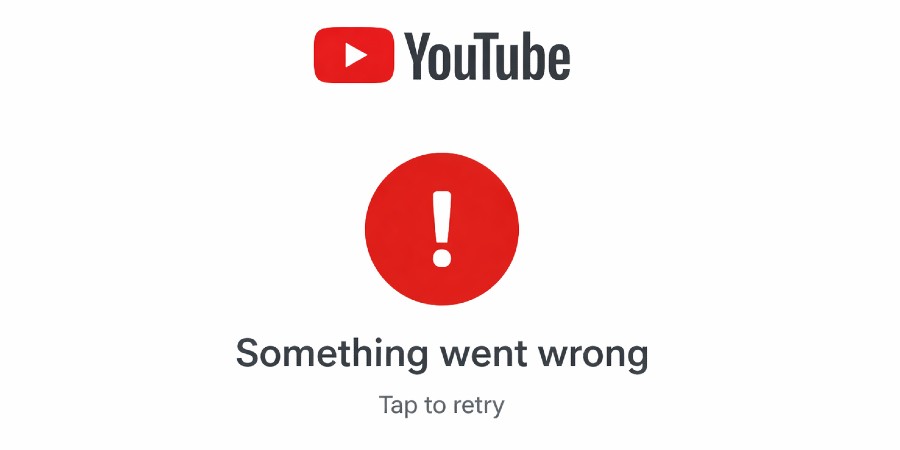
Instead of videos, you get a message saying “Something went wrong.” Not the soothing chaos of autoplay — actual error text.
Immediately your brain goes: Is YouTube down? Or is your Wi-Fi just being dramatic again?
If you’re wondering “is YouTube down” right now, you’re not alone. Users regularly report sudden errors, failed loads, and blank homepages. Before you start unplugging the router like it personally offended you, let’s walk through what’s actually happening and how to tell whether this is a real outage or just your house being chaotic.
What Does “Is YouTube Down” Actually Mean?
When people ask, “is YouTube down,” they’re usually seeing errors that prevent videos, search results, or the homepage from loading. A platform being “down” typically means its servers aren’t properly responding to user requests — either globally or in specific regions.
That doesn’t always mean the entire internet is on fire. Large platforms use distributed systems, so some areas may work fine while others see issues.
In short: “down” can mean totally unavailable, partially broken, or just glitchy enough to make everyone spiral.
What’s Happening When You See “Something Went Wrong”
If YouTube shows a message like “Something went wrong”, it usually means the app or website failed to retrieve content from the server.
This can happen because of:
- Server-side outages
- Temporary backend glitches
- App or browser conflicts
- Network or DNS issues
The tricky part? The message looks the same whether it’s a worldwide disruption or your toddler unplugged the modem to “charge their toy.”
How to Check If YouTube Is Down (Before You Panic)
Instead of assuming the worst, here’s a quick reality-based checklist to figure out if this is a you problem or an actual outage.
1. Try Another Device
- Open YouTube on your phone using cellular data (not Wi-Fi).
- Try a tablet, laptop, or smart TV.
- Switch to a different browser.
If it fails everywhere, that’s a clue it may not be your device.
2. Check Outage Trackers
Websites like Downdetector track spikes in user reports. If you see a sudden surge at the same time you’re having trouble, that supports the “is YouTube down” theory. You can also check YouTube’s official Help Center for service-related updates.
3. Look at Social Media (With Caution)
When thousands of people start posting “IS YOUTUBE DOWN?!” at once, something is probably happening. It doesn’t explain why, but it does show scale.
4. Watch for Official Updates
Sometimes companies post updates through official support channels or service dashboards. That said, those updates often lag behind real-time user complaints.
Quick Checklist: Signs It’s a Real Outage
- YouTube fails on multiple devices and networks
- Outage trackers show a sharp spike in reports
- Social media trends mention YouTube errors
- The same error message appears repeatedly
If all four are happening at once, chances are high the issue isn’t just your Wi-Fi having a personality disorder.
If YouTube Isn’t Down, Here’s What Might Be Wrong
If everything else online works and reports aren’t spiking, the issue may be local.
- Network problems – Weak Wi-Fi, ISP hiccups, or DNS issues.
- Outdated app – Old versions can glitch out.
- Browser extensions – Ad blockers or privacy tools sometimes interfere.
- Corrupted cache – Stored data can break things quietly.
Simple fixes that solve more problems than we’d like to admit:
- Restart the app or browser
- Clear cache and cookies
- Reboot your device
- Switch networks
Is YouTube Down — And Is It Worth Panicking?
Short answer: no.
Long answer: even the biggest platforms have occasional outages. It happens. Most disruptions are resolved within minutes to a few hours, depending on the cause.
If your work depends on uploads or tutorials, it’s smart to have a backup plan. Many creators diversify with options inside our broader side hustle ideas collection so one platform glitch doesn’t stall income completely.
Asking “is YouTube down” is reasonable. Declaring it the collapse of civilization? Slightly dramatic.
Realistic Expectations During a YouTube Outage
Let’s stay grounded.
- Fixes are often rolled out quickly, but not instantly.
- You may never get a detailed explanation.
- Some regions or features may work while others don’t.
- Your content is typically safe — temporary outages don’t delete accounts.
If you’re building income streams online, it’s also smart to explore platforms beyond video — including ideas outlined in our breakdown of realistic ways to make money from home that don’t rely on one app staying up 24/7.
Most outages are inconvenient, not catastrophic.
FAQs
Why does YouTube say “Something went wrong”?
This message appears when the app or website can’t properly retrieve data from YouTube’s servers. It may be a global issue or a local connection problem.
How can I confirm if YouTube is down?
Try different devices and networks, check outage tracking websites, and look for widespread user reports.
How long do YouTube outages last?
Many outages are resolved within minutes to a couple of hours, but timing depends on the technical cause.
Will I lose my uploads if YouTube goes down?
Temporary outages generally do not delete videos or accounts. Once service is restored, things typically function normally again.
Why does it work for some people but not others?
Large platforms operate across multiple servers and regions. An issue may affect certain areas or features while others remain operational.
Bottom Line
So, is YouTube down? If you’re seeing consistent errors across devices and reports are spiking, there’s a good chance something bigger is going on. If not, it might just be your setup needing a quick reset.
Either way, most YouTube disruptions are temporary. Check the basics, confirm what’s happening, and then step away for a minute if you need to.
The videos will be there. Your sanity matters more.








Leave a Reply